Automation Systems & Processing Pipelines
Bash & FFmpeg Multi-Bitrate Engine & Automated GCS Upload
Automated production-grade media processing pipelines developed with Unix Bash and multi-core FFmpeg workers for high-volume video transcoding and cloud deployment. Generates synchronized multi-bitrate HLS streams (1080p down to 360p), isolates clean AAC audio channels, creates 15-second previews, and autonomously stages and uploads all segmented manifests (.m3u8/.ts) directly to Google Cloud Storage with idempotent skip checks, retry loops, and full execution audit logging.
Interface Evidence & Workflows
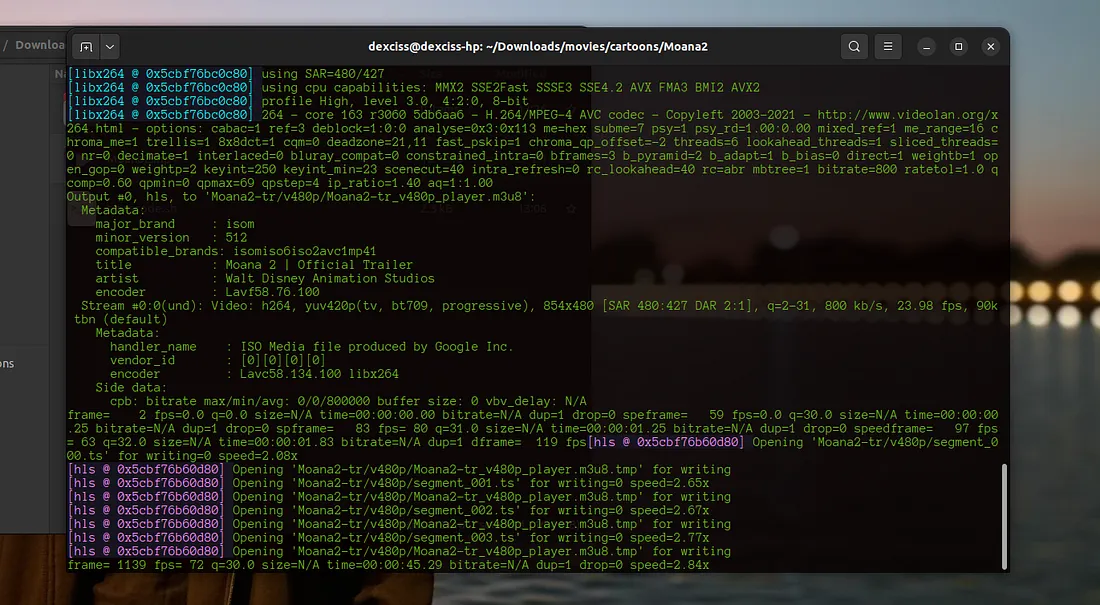
Live FFmpeg Transcoding Terminal
Active Bash worker terminal executing multi-core FFmpeg libx264 transcoding with live progress speed metrics (2.84x) and continuous HLS segment (.ts) chunk generation.
End-to-End Media Pipeline & Delivery Lifecycle
Source Video Ingestion & Validation
Bash script scans input directory, extracts media metadata (codecs, framerate, resolution), and prepares standardized resolution output directories.
Audio Extraction & Normalization
Demuxes audio streams from raw video files into standalone, normalized AAC audio tracks with dedicated audio playlists.
Multi-Resolution Transcoding & 15s Previews
FFmpeg encodes multi-rendition streams (1080p down to 360p) into timed .ts segments, creates 15-second preview clips, and writes master.m3u8 manifests.
Pre-Upload Check & Exclusion Filtering
Upload pipeline validates target GCS destination, checks exclude lists, and verifies if folders already exist in cloud storage to avoid redundant uploads.
Chunked GCS Upload with Retry Loops
Uploads all assets to Google Cloud Storage via gsutil CLI, logs success/failure status, retries failed folders, and outputs a complete execution summary report.
System Layers & Technical Design
Terminal CLI interface with progress logging, CPU core allocation monitors, and execution summary dashboards.
Multi-core Bash worker orchestration, FFmpeg libx264 multi-bitrate transcode pipelines, audio demuxing workers, 15-second preview generators, and automated GCS sync daemons.
Google Cloud Storage (GCS) bucket hierarchy, structured execution audit logs, and master .m3u8 manifest file registries.
The Engineering Challenge & Solution
Manual media transcoding across multi-bitrate renditions was painfully slow, unmonitored, and prone to system memory exhaustion when batch-processing large media files, while uploading thousands of fragmented HLS chunks to cloud storage frequently suffered from network drops and duplicate transfers.
Constructed robust Bash automation scripts with CPU core allocation, automated progress tracking, error trapping, and batch folder organization. Coupled this with a resilient Google Cloud Storage upload pipeline featuring duplicate detection, pre-upload validation, automatic retry loops for failed transfers, and comprehensive execution audit logging.
Production Impact & Delivered Capabilities
Engineered automated multi-resolution video transcoding pipeline generating 1080p, 720p, 480p, and 360p HLS renditions with aligned keyframes
Automated audio extraction and standalone 15-second preview generation for instant catalog trailers
Built resilient Google Cloud Storage upload automation with idempotent duplicate checks and automated retry mechanisms
Constructed comprehensive execution and error logging pipelines to trace batch processing times and upload status
Published two widely-read engineering guides on Medium detailing the FFmpeg transcode pipeline and Google Cloud upload scripts
Architecture & Process Flow Models
Automated Multi-Core Transcoding & Resilient GCS Upload Pipeline DFD
Data flow diagram illustrating multi-core FFmpeg Libx264 transcoding, audio demuxing, 15-second trailer preview clipping, unified master.m3u8 manifest synthesis, and resilient GCS cloud upload with retry loops.